Plots and Reports
"My experience with AQTESOLV has been nothing but favorable. It is simple to use and provides a comprehensive array of solutions. The help documentation and examples are superb. I have not found any comparable aquifer testing software available in the groundwater industry. It is a tool that every hydrogeologist should be using for planning and analysis of aquifer tests, and assessing the design capacity of wells."
--Mark Cunnane, P.E., P.G., Western Groundwater Services, LLC
Only AQTESOLV lets you choose from 17 different plots and reports to summarize the results of your aquifer test analyses.
Customize styles, weights and colors of lines, typefaces, sizes and weights of fonts and more!
Use the Style Gallery to select plot formats provided exclusively by AQTESOLV. Include your own company logo on the output!
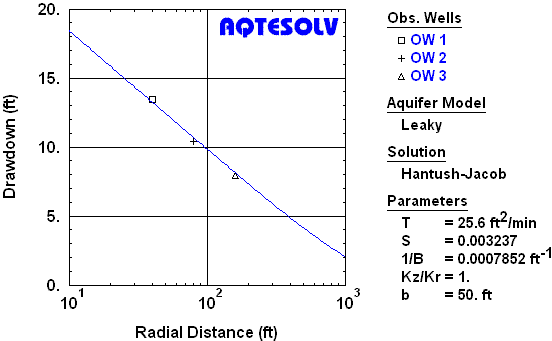
Distance-Drawdown Plot
A distance-drawdown plot is a useful plot for analyzing more than one observation well. For a specific measurement time, drawdown is plotted as a function of the radial distance from the pumping well to the observation well.
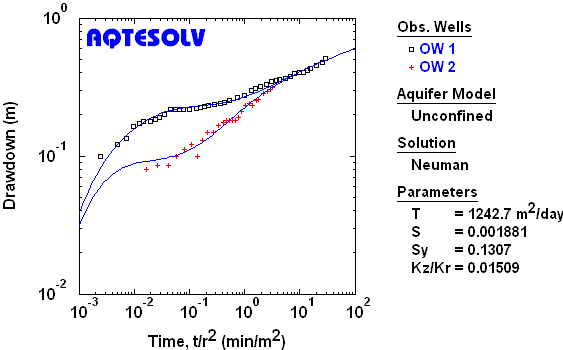
Composite Plot
A composite plot is a useful plot for analyzing more than one observation well. For each observation, the time measurement is normalized by the square of the radial distance from the pumping well to the observation well (t/r²).
Printing
Print plots and reports with any printing device connected to your Windows system.
View AQTESOLV plots and reports before sending them to your printer with WYSIWYG print preview.
AQTESOLV now provides a batch printing feature that allows you to print multiple tests using a consistent format.
Export and Clipboard Functions
Export plots, reports, data and type curves from AQTESOLV to files (e.g. Windows metafiles) for use by other applications. Options also include sending printer output to a file for delayed printing.
Copy plots from AQTESOLV and paste them into other Windows applications (e.g., Word, Excel or Powerpoint)!
Copy data (e.g., time-displacement data) from other Windows applications such as spreadsheets and word processors and paste them into AQTESOLV!