Troubleshooting For Grid/Spreadsheet Control
Grid Control
AQTESOLV uses a control called msflxgrd.ocx to display a spreadsheet for pumping rates and observations. If not already present on your computer, this control is installed when you install AQTESOLV.
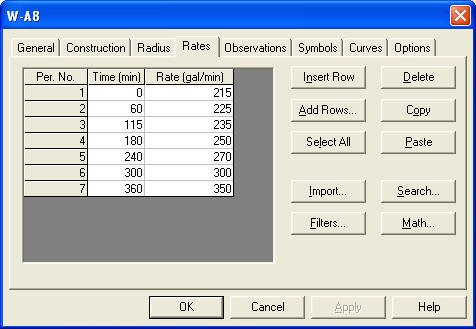
If you don't see the grid/spreadsheet when you are entering pumping rates or observations and the area to the left of the buttons is empty, you need to check that AQTESOLV is installed correctly.
Find troubleshooting information below to assist you with issues relating to the grid control.
Troubleshooting
- Install with admin privileges
- DEP settings
- Deployment software/script settings
- Manual installation of grid control
- Missing or corrupt system files
Install AQTESOLV with Administrator Privileges
Adminstrator privileges are required for proper installation of AQTESOLV and the grid control.
Some customers have reported that running the AQTESOLV installer (the setup program) a second time using an adminstrator account has resolved the missing grid control issue.
Check Settings for Data Execution Protection
Windows settings for Data Execution Prevention (DEP) have remedied the grid control issue for many customers.
Here are some screenshots to help you find and check DEP settings on your computer.
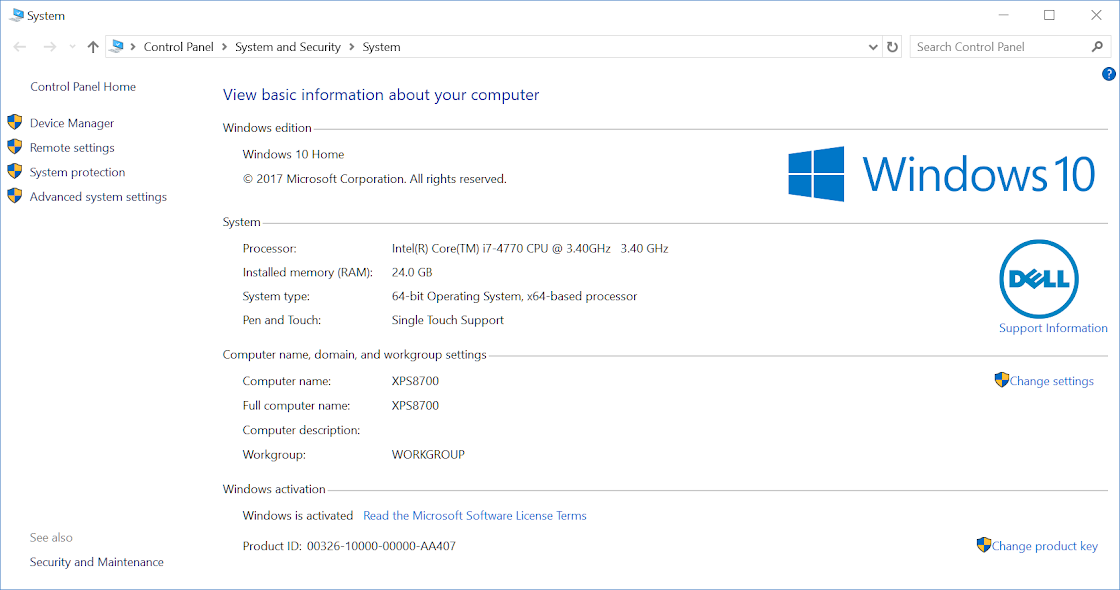
1. Go to Control Panel > System and Security > System and click Advanced system settings.
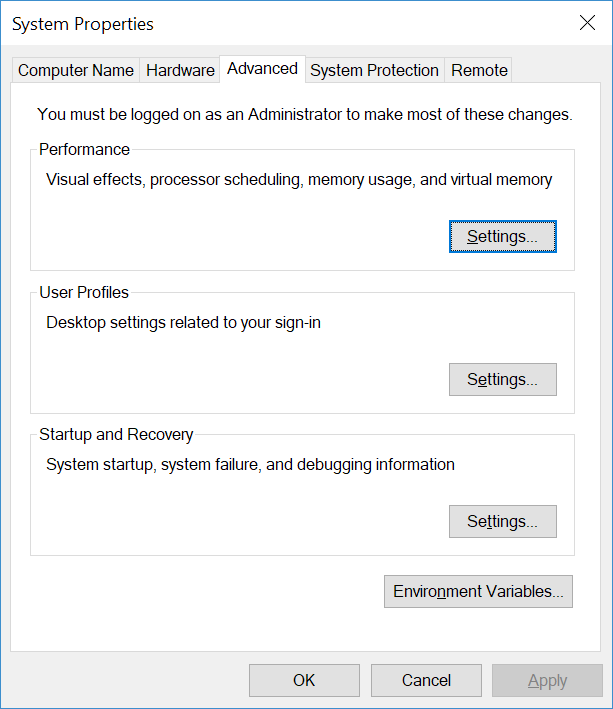
2. In the System Properties window, click Settings in the Advanced tab.
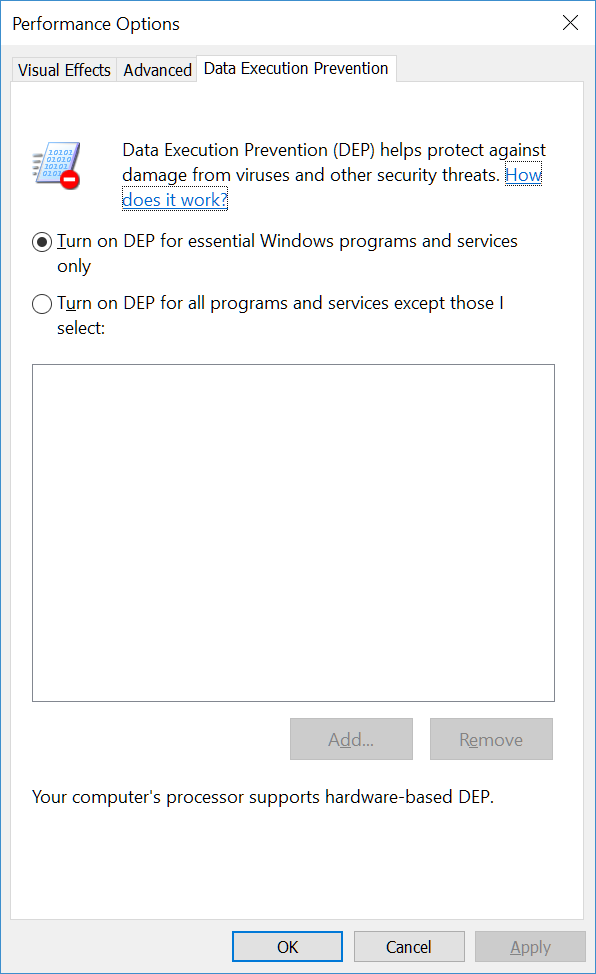
3. In the Performance Options window, you can change DEP settings in the Data Execution Prevention tab. If the option to "Turn on DEP for all programs and services" is selected, you may have to add an exception for AQTESOLV. In our case, DEP is only turned on for essential Windows programs and services.
Check Deployment Settings
If you are using deployment software or scripts to assist with the installation of AQTESOLV, you may need to check exclusions or other settings.
For example, to allow the AQTESOLV installation program to properly install and register the grid control on a target computer, make sure that registry changes to HKLM:\SOFTWARE\Classes are not excluded.
- Review details for manually installing the grid control as well
Install the Grid Control Manually
If the grid/spreadsheet control does not appear after installing AQTESOLV with the installer, you can install and register the control manually as a remedy.
Perform the following steps to install and register the msflxgrd.ocx control on a 64-bit Windows system:
- Download the control from http://www.aqtesolv.com/download/msflxgrd.ocx.
- Place the msflxgrd.ocx file in the c:\windows\syswow64\ folder.
- Open a Command Prompt (Admin) window and run the following commands:
c:\windows\syswow64\regsvr32 /u c:\windows\syswow64\msflxgrd.ocx
c:\windows\syswow64\regsvr32 c:\windows\syswow64\msflxgrd.ocx
After manually installing and registering the grid control, check Data Execution Prevention settings on your computer.
Check for Missing/Corrupt System Files
Missing or corrupt system files may interfere with the proper installation and use of AQTESOLV and the grid/spreadsheet control on an individual computer workstation.
Use the System File Checker tool to find and repair missing or corrupt Windows system files. Here are some helpful links (or perform a web search):
- https://support.microsoft.com/en-us/windows/using-system-file-checker-in-windows-365e0031-36b1-6031-f804-8fd86e0ef4ca
- https://www.howtogeek.com/222532/how-to-repair-corrupted-windows-system-files-with-the-sfc-and-dism-commands/
- https://www.lifewire.com/how-to-use-sfc-scannow-to-repair-windows-system-files-2626161